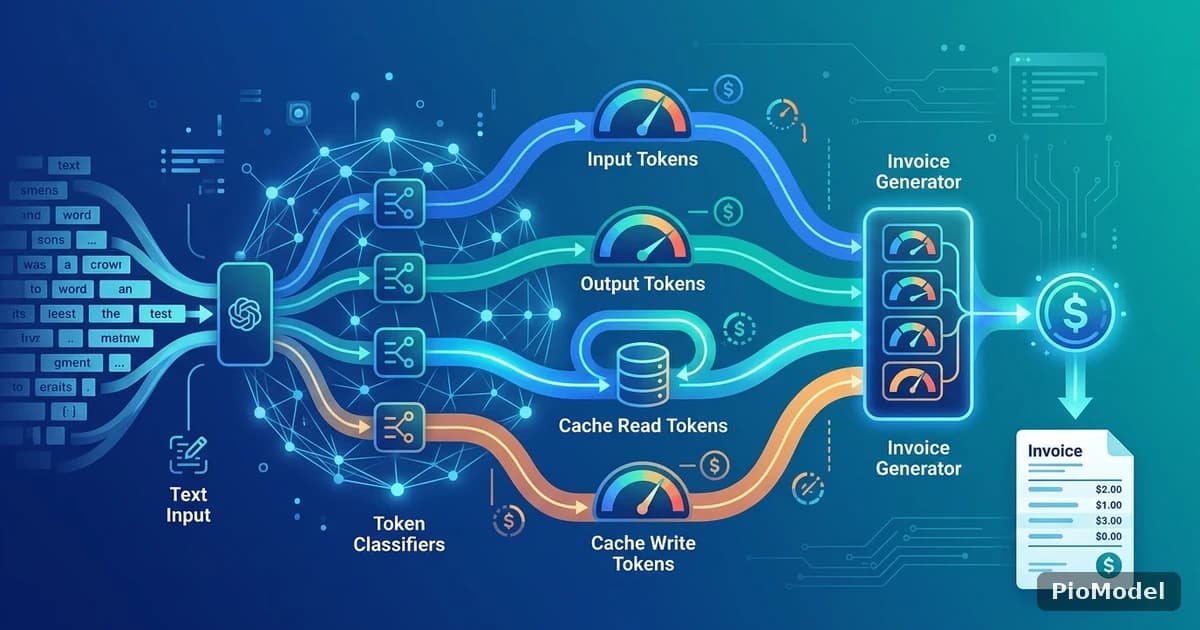
Every LLM API bills by tokens, but "how much does this cost" rarely has a single number, because a single request can mix four different token categories, each priced differently: input tokens, output tokens, and — for providers that support it — cache read and cache write tokens. Understanding which category a given request falls into is the difference between an accurate cost estimate and a surprise invoice.
What a token actually is
A token is a chunk of text — often a word fragment, sometimes a whole short word — that a model's tokenizer splits your input into before processing. Tokenizers differ slightly between model families, so the exact same sentence can produce a different token count depending on which model processes it.
Why does the same sentence cost differently on different models?
Different model families use different tokenizer vocabularies, so text heavy in a language or symbol set poorly represented in a given tokenizer's training data will split into more tokens — and cost more — on that model than on one with a better-matched vocabulary.
Input tokens vs. output tokens
Across essentially every major provider, output tokens are priced higher than input tokens — often several times higher. This reflects the actual compute cost difference: generating each output token requires a full forward pass, while a large batch of input tokens can be processed more efficiently in parallel. Practically, this means a prompt-heavy, response-light workload (like classification or extraction) is cheaper per call than an open-ended generation task, even at the same total token count.
What does this mean for how I write prompts?
It means the cost lever most teams overlook isn't shortening input — it's constraining output length. Asking for a structured, bounded response (a JSON object with fixed fields, a short summary with a word cap) reduces output tokens directly, which is usually the larger cost line item.
Cache read and cache write: the categories most teams don't budget for

Several providers support prompt caching: if you send the same long system prompt or context block repeatedly, the provider can cache it after the first request and charge a reduced rate for reading it on subsequent requests, at the cost of a (usually cheap) cache-write fee the first time. For workloads with a large, stable context, this can meaningfully cut the input-token cost, since cached reads are typically priced well below standard input tokens.
When is caching not worth it?
If your context changes on every request, there's nothing stable to cache, and the write fee is paid for nothing. Caching pays off specifically when a large chunk of the prompt repeats across many calls in a short window.
A practical way to think about cost before you build
| Token category | Typical relative cost | Where it shows up |
|---|---|---|
| Input (standard) | Baseline | System prompt, user message, any context sent fresh each time |
| Output | Several times the input rate | Everything the model generates in response |
| Cache read | A fraction of the standard input rate | Repeated context served from cache on subsequent calls |
| Cache write | A modest one-time premium over standard input | The first call that populates the cache |
Exact multipliers vary by model and change over time, so treat this table as a mental model for where cost comes from, not a source of specific numbers — check current per-model pricing before finalizing a budget.
Why this matters more once you're calling multiple models
Once a team uses more than one model — Claude for reasoning-heavy tasks, a cheaper model for classification, DeepSeek for cost-sensitive batch work — the four-category structure above repeats per model, with different absolute rates. Tracking this manually across separate provider dashboards gets unwieldy fast.
PioModel bills every request — across Claude, GPT, DeepSeek, GLM, Kimi, Qwen, Llama, and Grok — through the same transparent, pay-as-you-go ledger, so cost comparisons across models don't require exporting data from separate dashboards.


Comments
Sign in to join the discussion